
Attendance in, salary out.
In Stebly HR and Payroll, punches come in from the machine at the gate, each shift's rules mark late, half days and overtime, and the month's salary is worked out from the register and posted to the books.
- Punches from the gate machine
- Late and overtime by shift rules
- Salary posted to the books
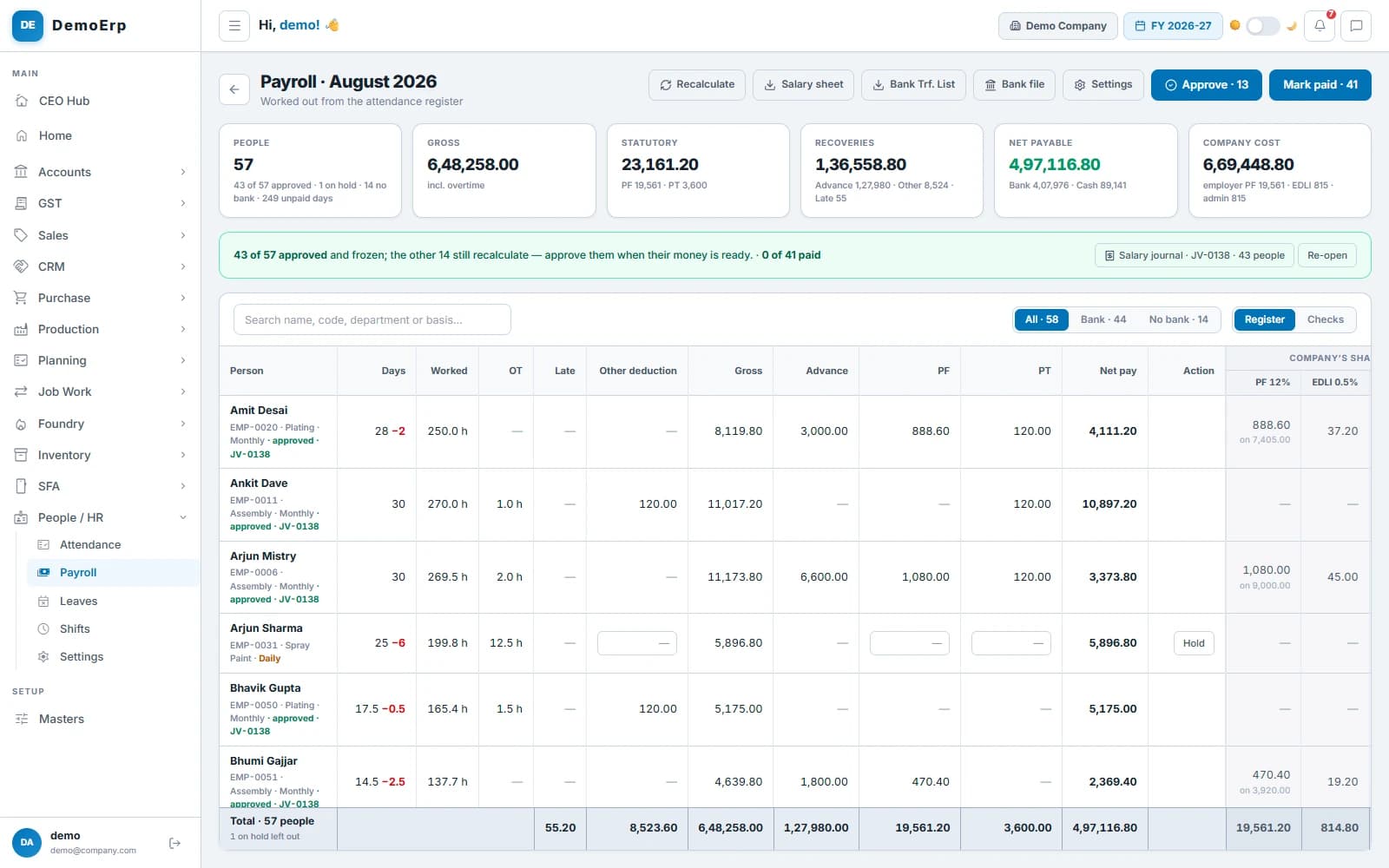
Real Stebly screens, shown with demo data.
This page is for you if…
- Attendance comes from a register nobody trusts.
- Overtime is argued over every month.
- Salary takes days in Excel at month-end.
- Advances are recovered from memory, if at all.
Used by HR, supervisors, accounts and the owner.
How people are paid right in Stebly, in 6 steps.
Real Stebly screens, with the demo company's numbers.
- step 1 of 6
Attendance from the gate machine
Face, fingerprint or card machines at the gate send every punch straight into the register, so the day's attendance is there without anyone typing it.
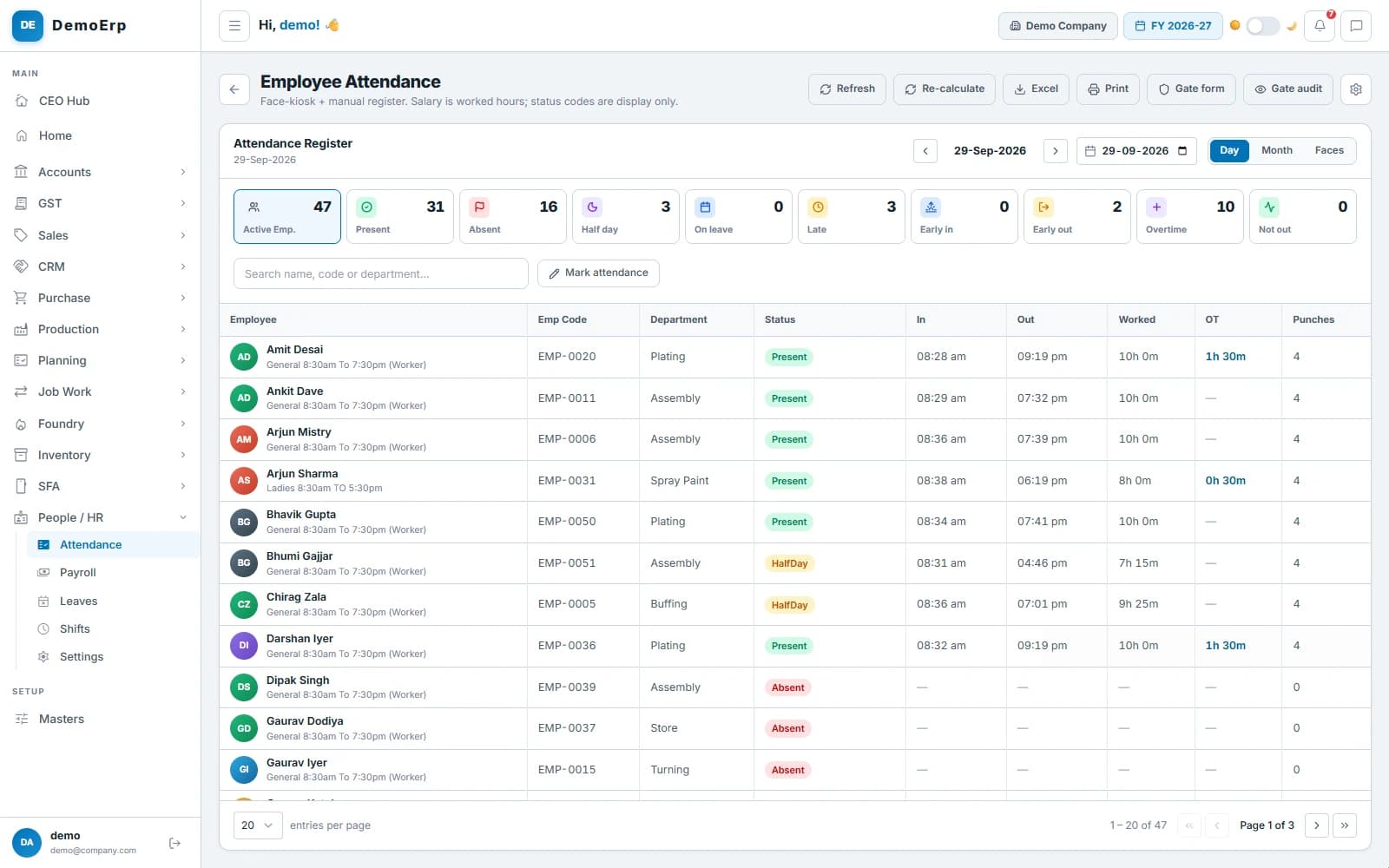 29 September: 31 present, 3 half days, 3 late and 10 on overtime, read from the machine's punches.
- Each punch lands in the register as it happens, with no machine maker's cloud in between.
- A new machine records nothing until you approve it, and each machine id is matched to an employee.
- A machine that goes quiet raises an alert, and punches held back are added once it is sorted.
- Days can still be marked by hand, for one person or many at once, with every change kept.
- step 2 of 6
Shifts that set the rules
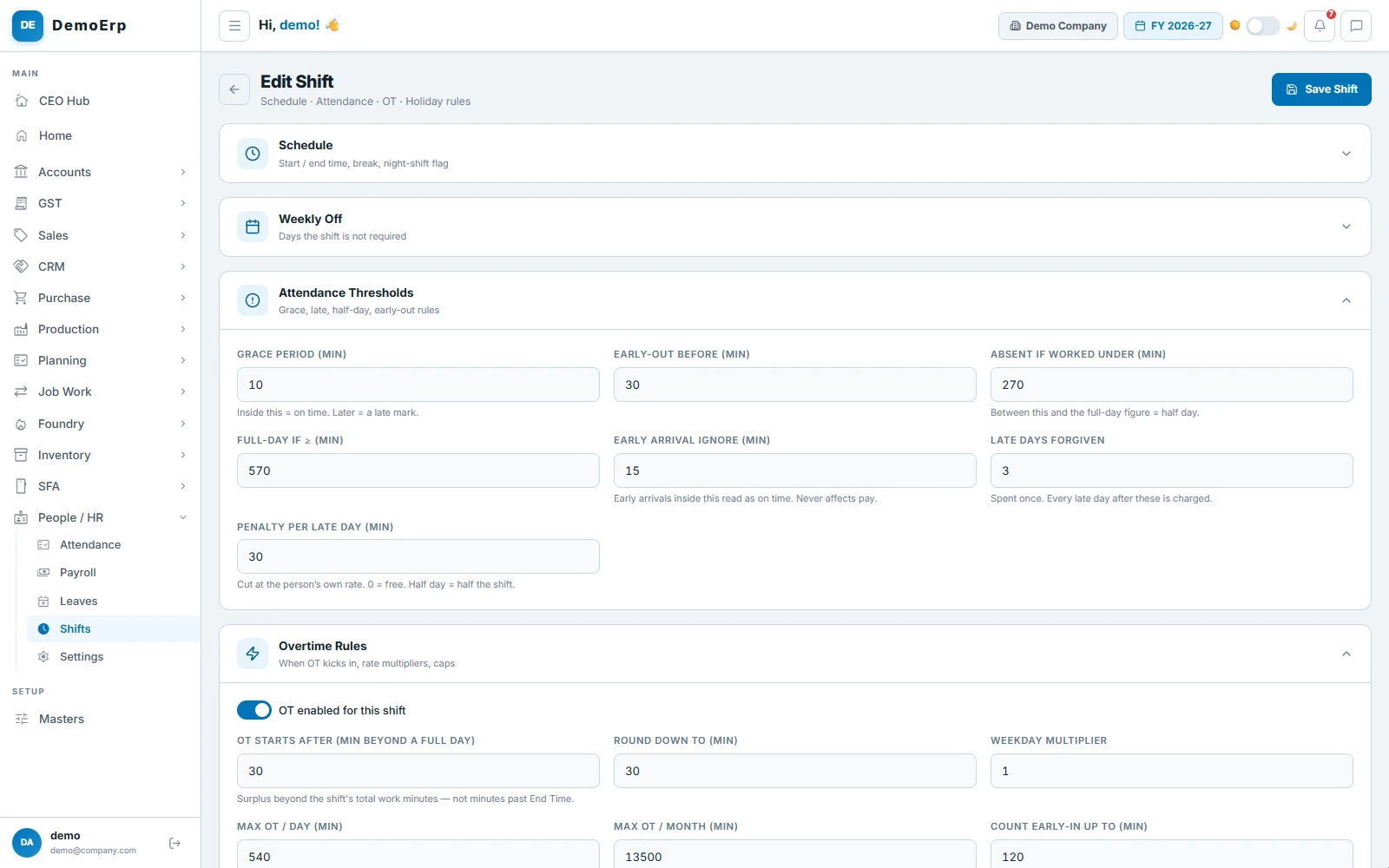
Each shift says when the day starts, how late is late, what counts as a half day and when overtime begins, so every punch is read the same way.
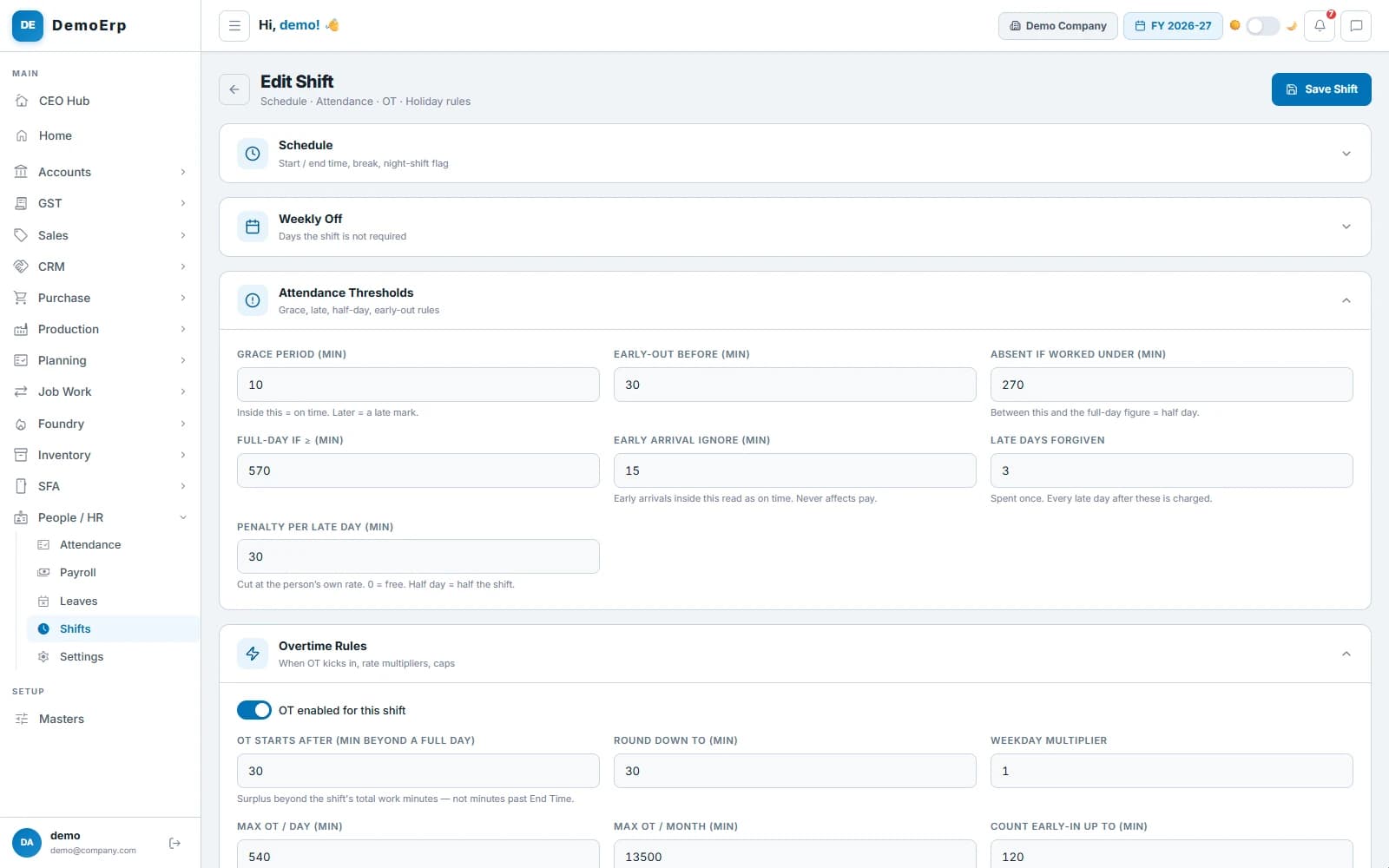 The worker shift: 10 minutes' grace, a full day at 9½ hours, 3 late days forgiven, and overtime after 30 minutes more.
- Grace minutes, early-out, half-day and absent marks, set for each shift.
- A few late days forgiven each month, then a cut for every one after.
- Overtime after a full day, rounded and capped, at weekday, weekend or holiday rates.
- Night shifts, weekly offs and alternate Saturdays, and a missed punch-out closed at shift end.
- step 3 of 6
The whole month at a glance
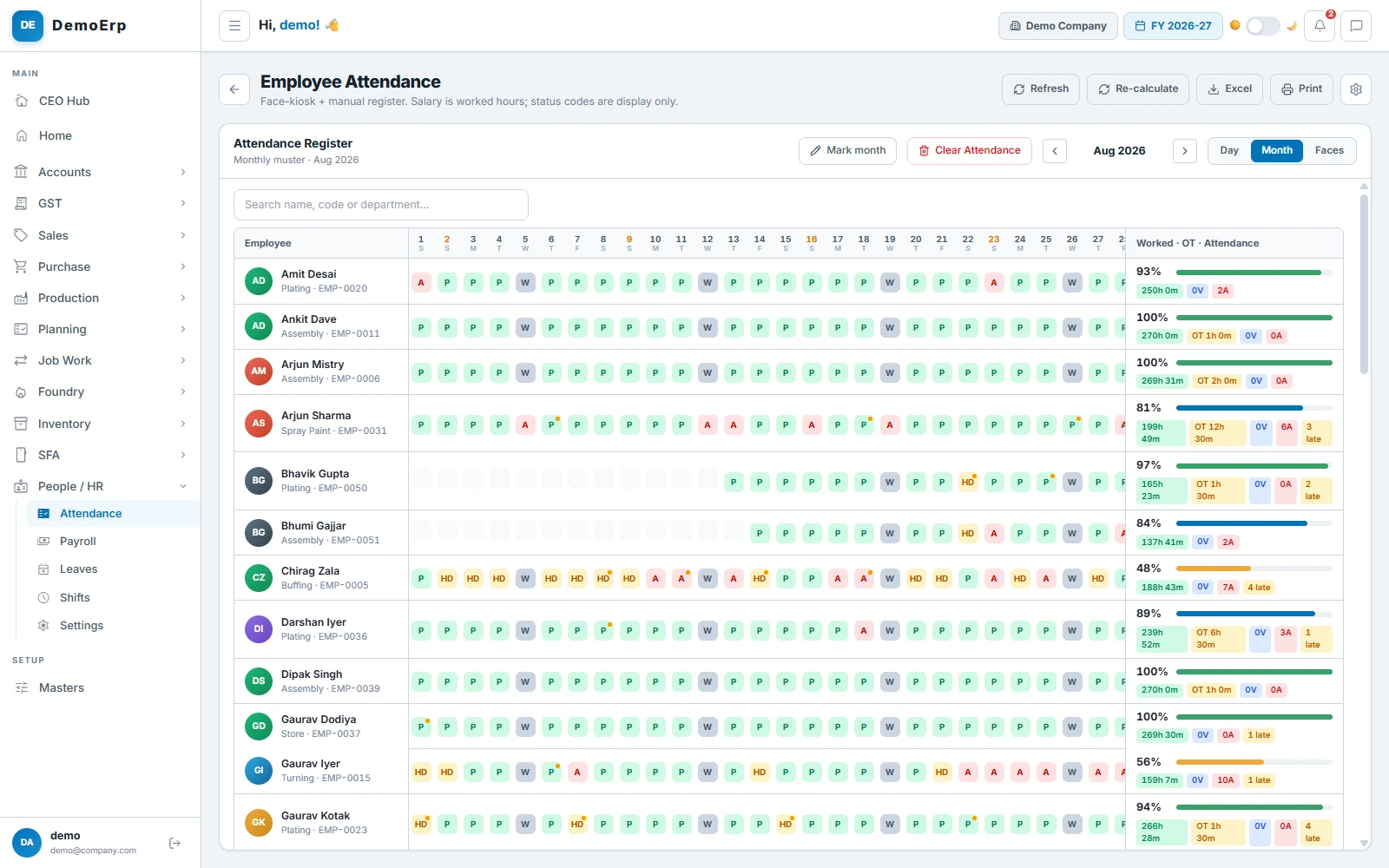
The muster shows each person's month day by day, with hours, overtime, absences and late marks added up on the right.
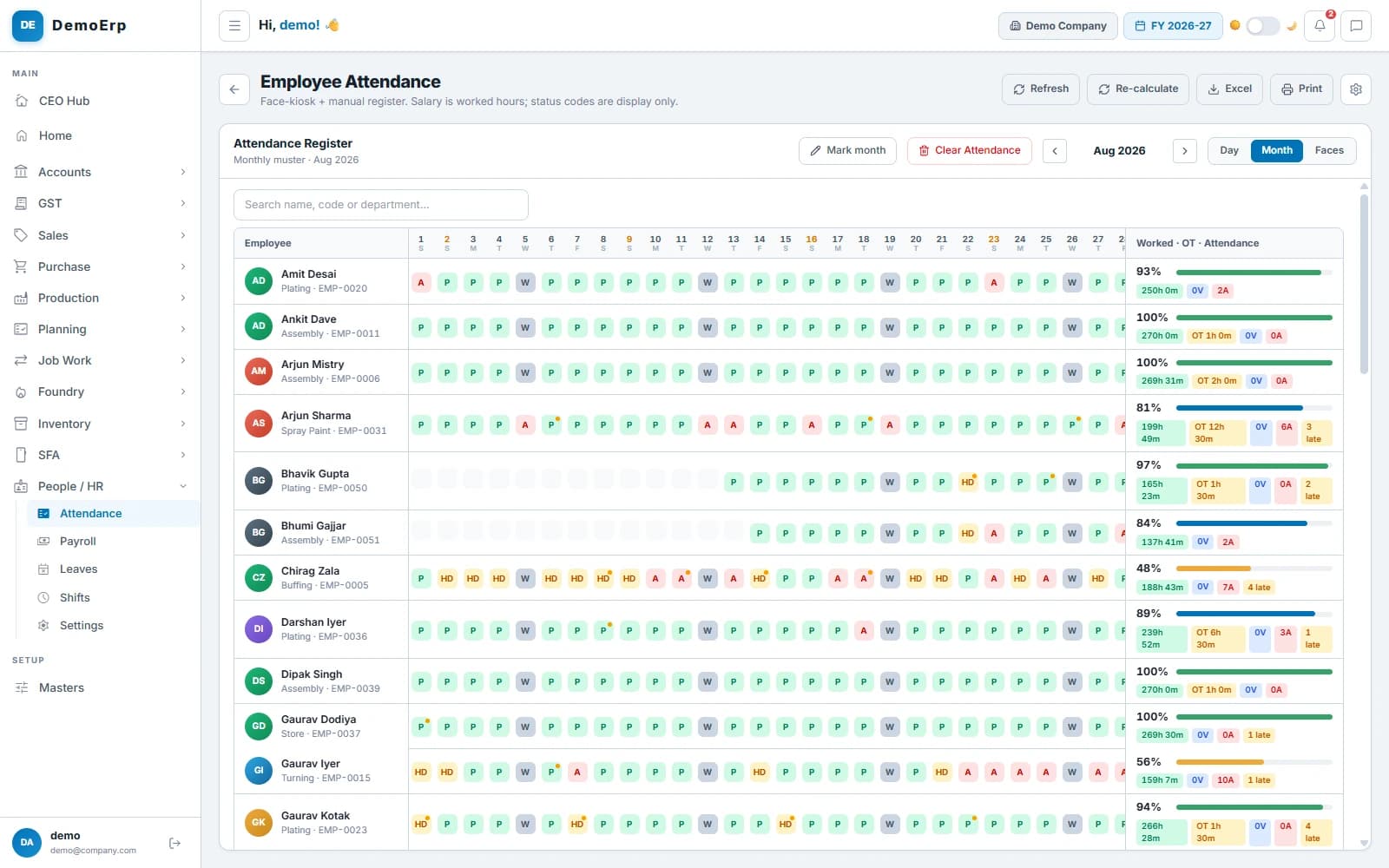 August: every person's days, with hours, overtime, absences and late marks added up on the right.
- A mark for every day: present, half day, leave, holiday, weekly off or absent, and a dot for a late day.
- Hours worked, overtime and late days added up for each person.
- Print it on your letterhead, or take it to Excel.
- Once a month's salary is approved, its attendance is locked.
- step 4 of 6
Leave, with every balance
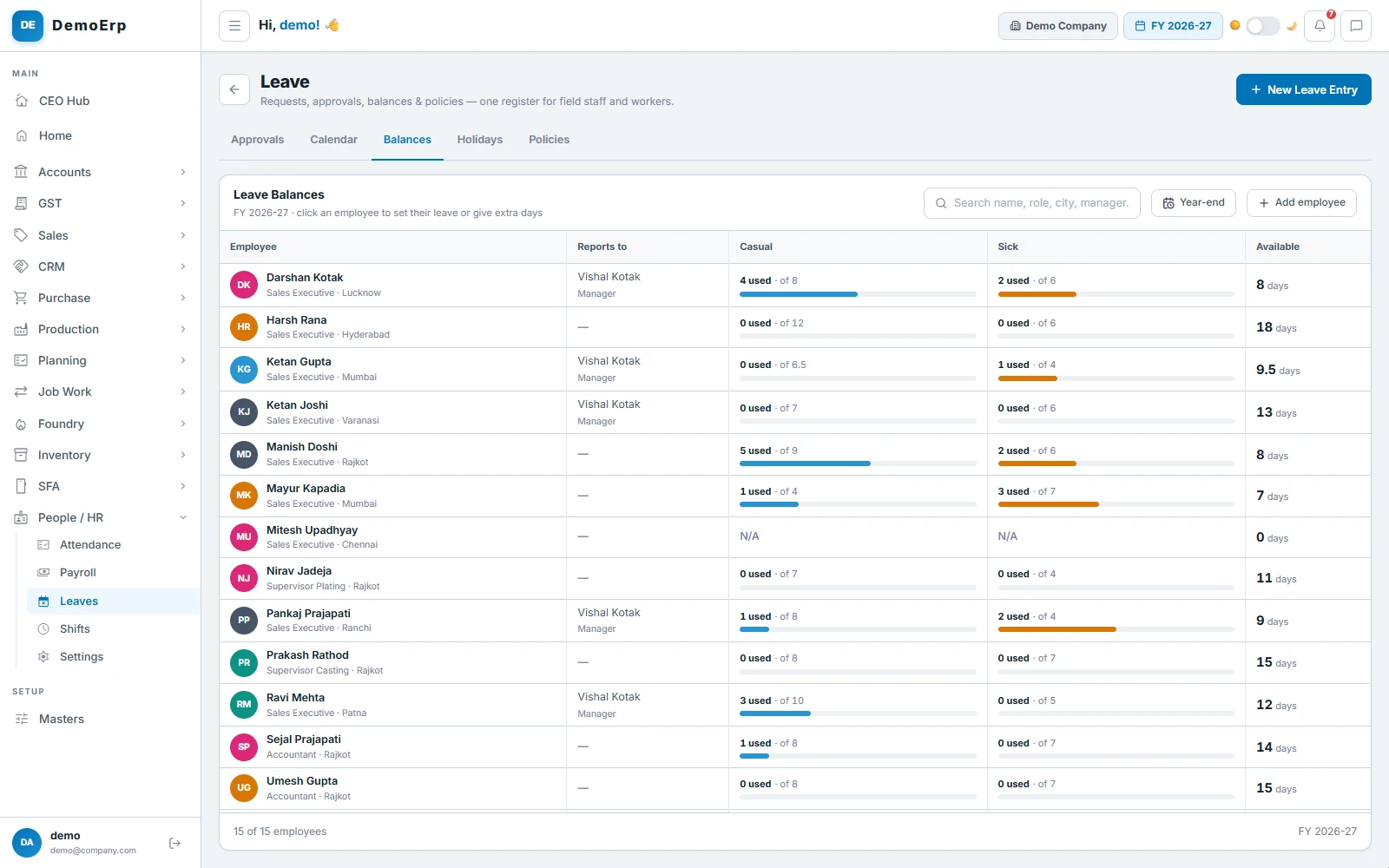
Every person's leave sits in one ledger: what they get, what they took and what is left, for each type of leave, for the year.
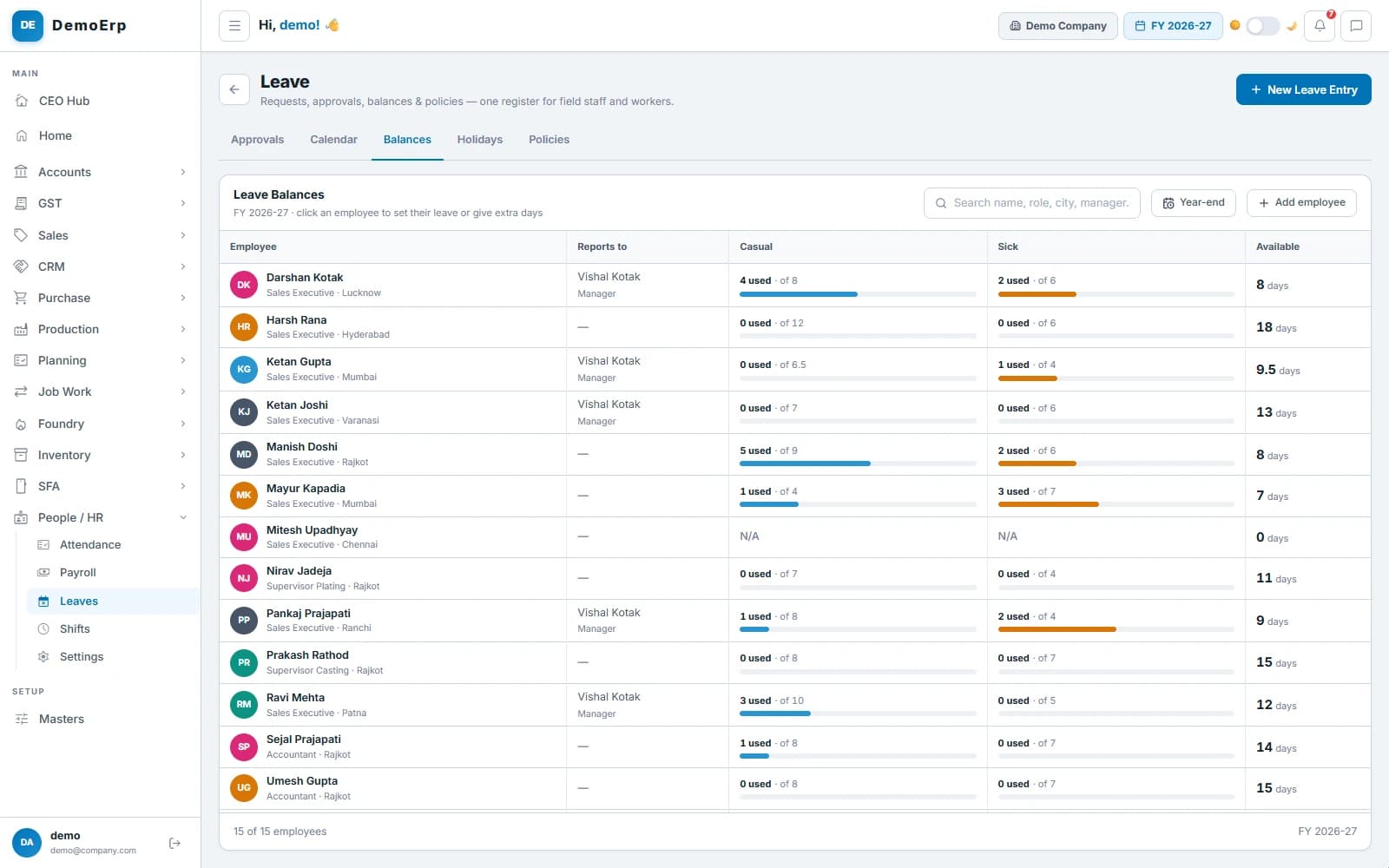 This year's casual and sick leave for each person: how much is used, how much is allowed and what is left.
- Your own leave types and rules: casual, sick, earned, comp-off or unpaid.
- Joiners get leave for the months left; at year-end it carries over, lapses or is paid out.
- Field staff apply from the mobile app, and leave waits in the same approvals inbox as everything else.
- Holidays by state, city or team, and a calendar of who is off.
- step 5 of 6
Salary from the hours worked
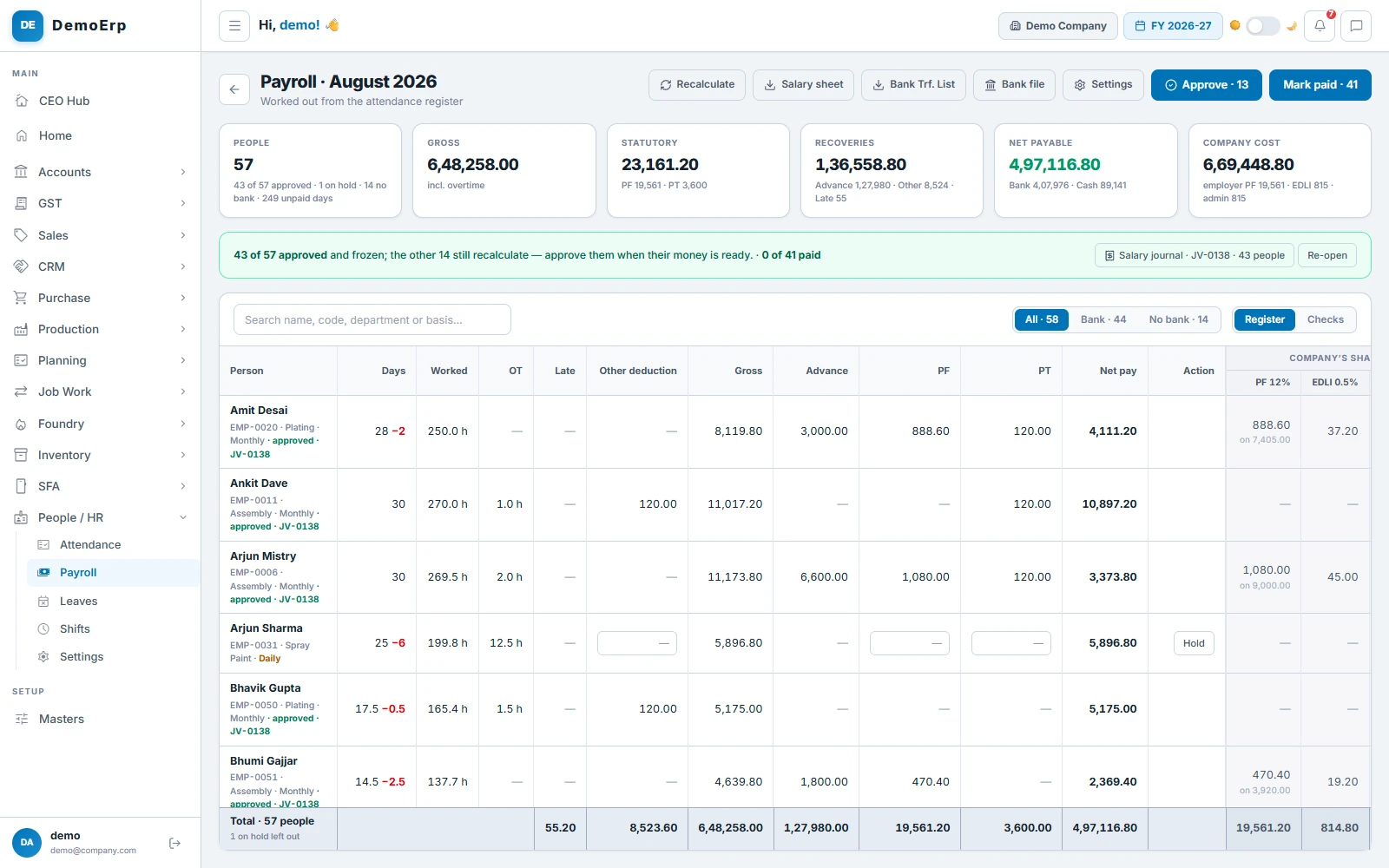
One run a month works out everyone's pay from the attendance on file, so nobody builds a salary sheet by hand.
August: ₹6.48 L gross for 57 people, ₹23,161 of PF and PT, ₹1.28 L of advances recovered, and ₹4.97 L to pay.- Monthly salaries or daily wages, paid on the days or the hours worked.
- Overtime and late cuts from the shift rules, and unpaid days cut on their own.
- PF, ESI, PT and TDS deducted, with the company's PF and EDLI worked out.
- Advances recovered, and bonus, incentives or arrears added as one-off lines.
- step 6 of 6
Approve, pay and post
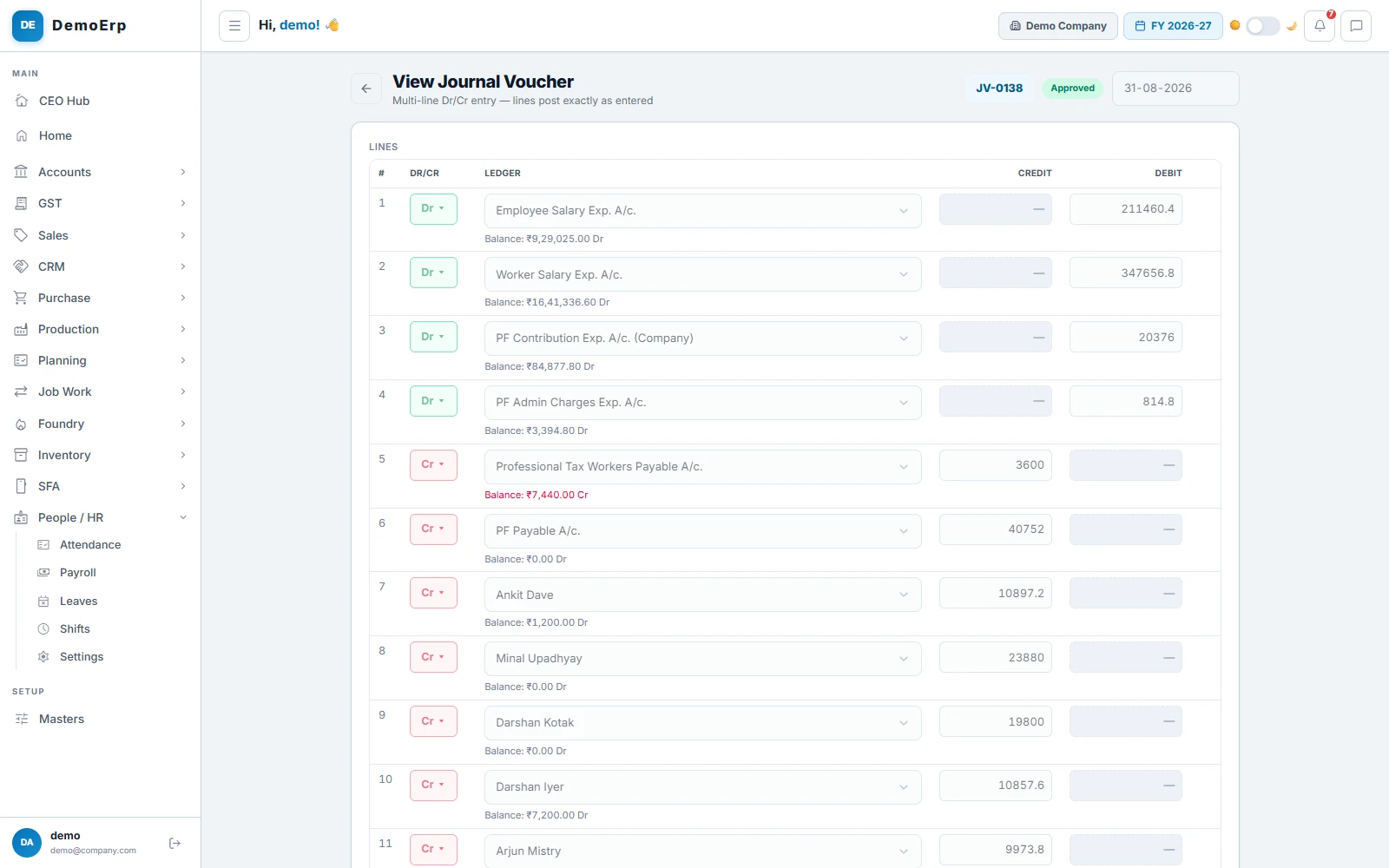
Approve the run in lots as the money is ready. Each lot posts its salary journal to the books on its own, and the payments follow.
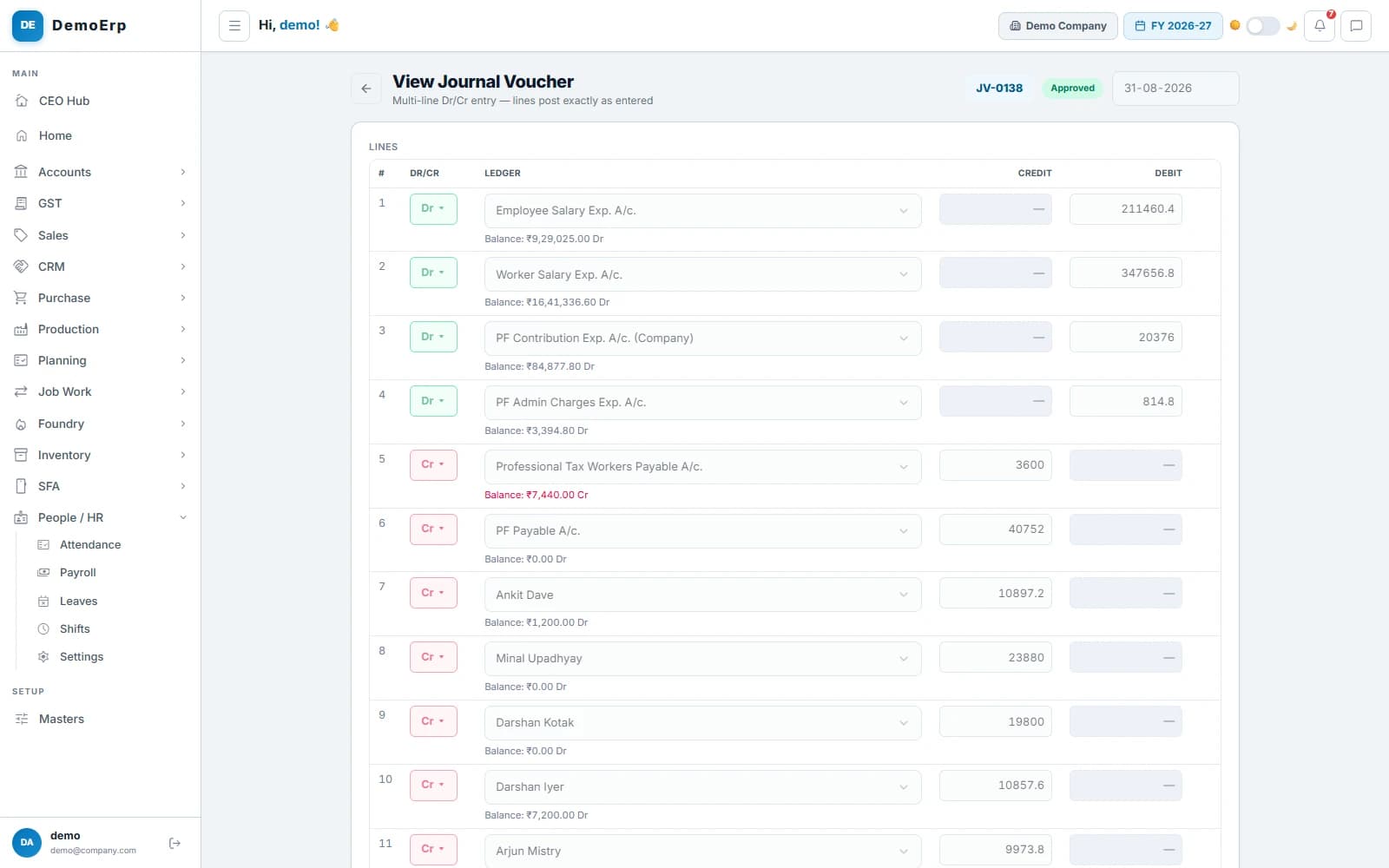 August's salary journal, JV-0138: salaries and the company's PF on one side, PF and PT payable and each person's pay on the other.
- Checks before approval: no bank account, no UAN, a big jump in net pay.
- Each approved lot posts a salary journal: salaries, PF, ESI, PT and TDS payable, and each person's account.
- A bank transfer list, an HDFC bulk-upload file and the salary sheet in Excel.
- Mark people paid by bank, UPI, cheque or cash, and print each payslip or save it as a PDF.

Everything in HR and Payroll.
- Punches from face, fingerprint or card machines
- Machines approved and matched to employees
- Attendance marked by hand, with every change kept
- Day register and monthly muster
- Shift rules for late, early-out and half days
- Night shifts, weekly offs and alternate Saturdays
- Overtime with rates and caps
- Late penalty after forgiven days
- Leave types, rules and balances
- Leave for joiners, carry-over, lapse and pay-out
- Holidays by state, city or team
- Leave requests in the approvals inbox
- Payroll from attendance, by days or hours
- Monthly salaries and daily wages
- PF, ESI, PT and TDS deductions
- Advance recovery and one-off lines
- Checks before approval
- Salary journal posted on approval
- Bank transfer list and HDFC bulk file
- Payment vouchers for each person
- Payslips to print or save as PDF
- Employee master with Excel import
Every module is in one plan, and they all work on the same data.
Questions about Stebly HR and Payroll.
Does Stebly take punches from attendance machines?
How are late marks and overtime worked out?
Does payroll handle PF, ESI, PT and TDS?
Is there a limit on employees?
See your salary run from your punches.
We set up your shifts and your machine, and walk you through a month from punches to payslips. Send your item list on WhatsApp and we'll run it on your own data.